Skip to content
Azinove, Home

Case study · Portfolio

Kinderhaus — Bilingual Adaptive Learning for Children

An English–Arabic learning platform for children aged 5 to 10 with special educational needs, with its own space for the child, the parent, the teacher and the administrator.

View the projectProduct design and engineering by Azinove

Project facts

Client
Kinderhaus
Market
Bahrain
Languages
English · Arabic
Learners
Ages 5 to 10 · KG2 to Grade 5
Spaces
Child · parent · teacher · administrator
www.kinderhaus.io
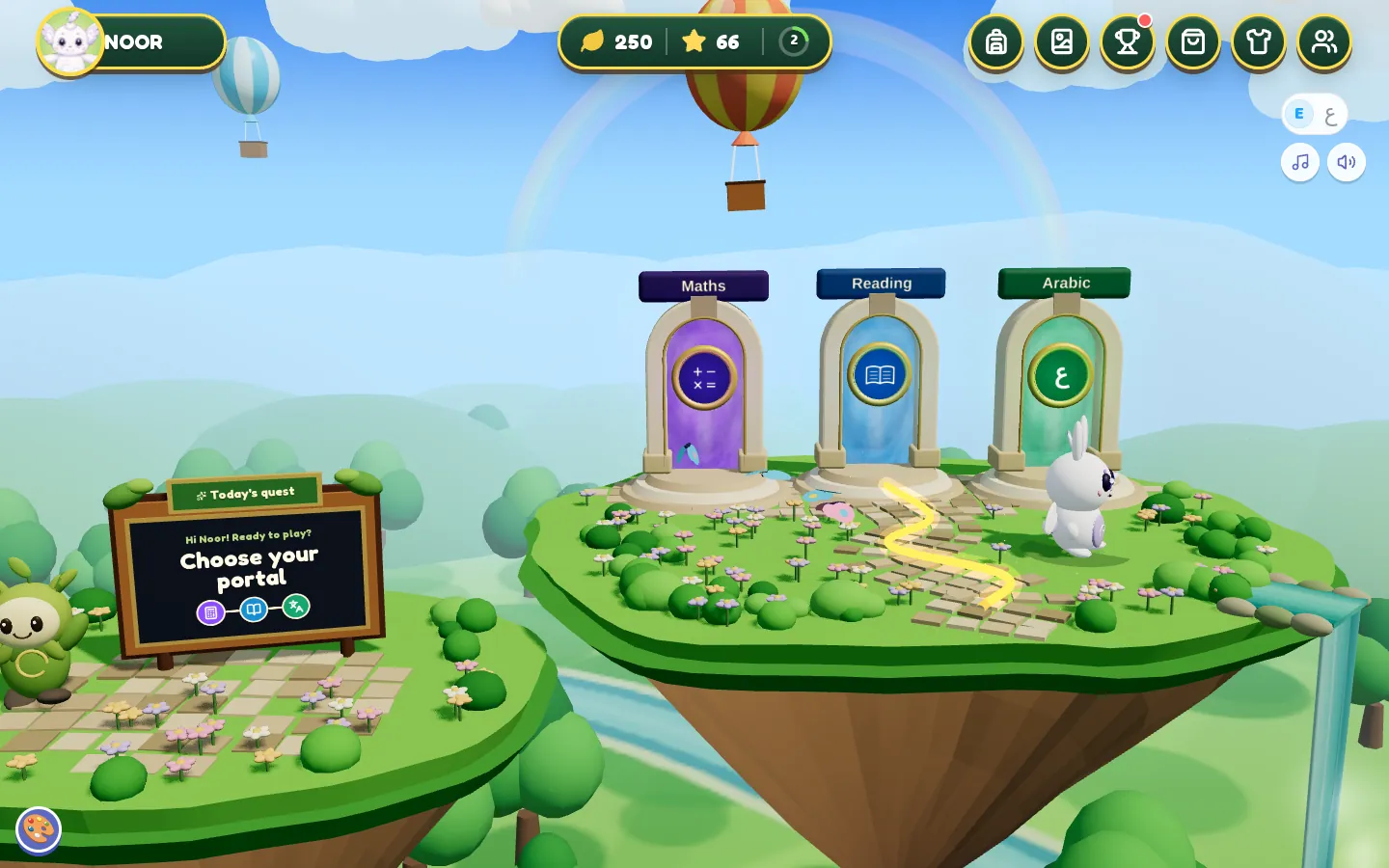
The child’s world in Kinderhaus: one portal per subject
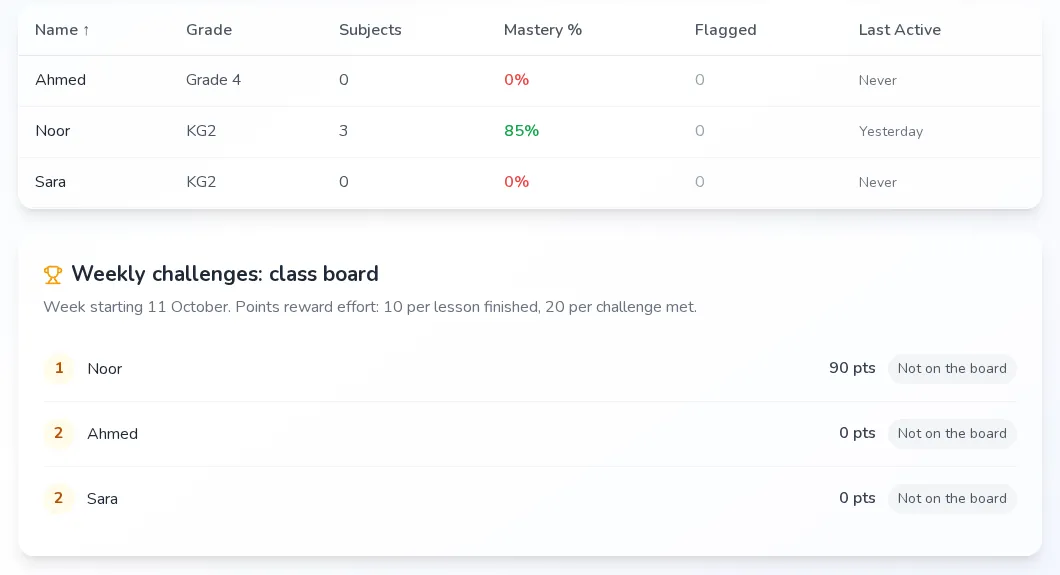
The teacher’s class in Kinderhaus

Screens captured from a local copy of the product running on its own demo data (made-up first names Noor, Sara and Ahmed): no real child’s data.

The project

One record, seen by the child, the parent, the teacher and the administrator

Kinderhaus (kinderhaus.io) is an online learning platform in English and Arabic for children aged 5 to 10 with special educational needs, from KG2 to Grade 5. It teaches Maths, English and Arabic in 90 lessons mapped to the Bahrain Ministry of Education framework.

Four people use it, each in their own space: the child, who never signs in and learns in a 3D world with a companion called TapTab; the parent, who creates the family account, sets up each child’s learning support and follows progress; the teacher, who follows a class and steps in; and the administrator, who manages accounts and signs off the curriculum.

The challenge

Children with dyslexia, ADHD or autism do not need the same lesson. One needs bigger text and every line read aloud, another a checkpoint every few questions, another a still and quiet screen. Kinderhaus needed that support inside every lesson, in English and in Arabic with full vowel marks for young readers, for children too young to manage a password. Around each child, parents, teachers and administrators needed their own view of the same record, and none of them could see another role’s screens.

What we did

Azinove designed and built the whole product, not only the public site.

For the child: a 3D world with one portal per subject, a daily feelings check-in, a placement game per subject that never asks for a school year, and 3D games in which TapTab reads every question aloud, a wrong answer brings up the lesson’s own hint, and three right answers in a row double the coins. For the parent: onboarding, a learning-support profile per child and a learning record. For the teacher: a class view, a page per student and the tools to step in. For the administrator: users, class assignments, a bilingual lesson editor with an approval workflow, and the platform rules.

Lessons adapt by rule, not by guesswork: three right answers in a row raise the level, two wrong answers lower it, and concepts come back after 1, 3, 7 and 14 days until they are passed at 80%. Claude, through the Vercel AI Gateway, helps draft content in the authoring scripts and never runs during a lesson: a lesson reaches a child only once an administrator has approved it, it has passed the automated quality checks and its version is frozen.


This case study is based on the project’s own information; any outcomes mentioned are not independently measured.

Four spaces

Four people, each with their own space

Each role comes in through its own door and sees only what concerns it. Behind the doors, it is the same learning record.

  1. The child

    Signs in
    Never: uses the parent’s session
    Lands on
    Their 3D world
    • Picks a subject, plays, earns coins
    • Never sees a class list or a grade
    See the screens: The child
  2. The parent

    Signs in
    Email or Google
    Lands on
    The learning record
    • Adds each child without ever being asked for a school year
    • Sets each child’s learning support
    See the screens: The parent
  3. The teacher

    Signs in
    Account created by an administrator
    Lands on
    Their class
    • Sees only the children assigned to them
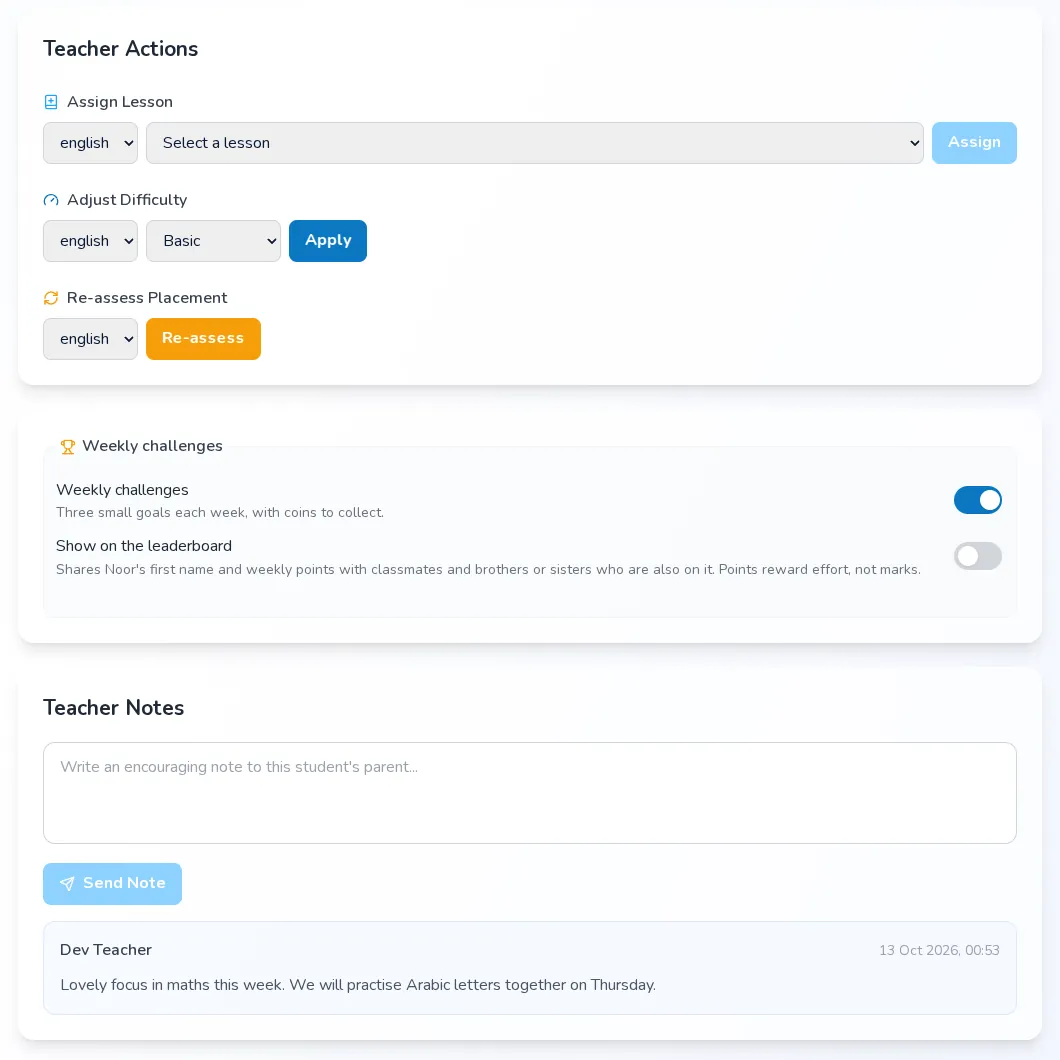
    • Assigns lessons, adjusts difficulty, writes to parents
    See the screens: The teacher
  4. The administrator

    Signs in
    Account created by an administrator
    Lands on
    The admin panel
    • Runs accounts, assignments and rules
    • Reviews and approves every lesson
    See the screens: The administrator

Roles never cross: a teacher or an administrator cannot open a parent’s or a child’s screens.

The child

One lesson, from hello to reward

The child never types a password and is never asked for a school year: placement decides. Everything is read aloud by TapTab, in English or in Arabic.

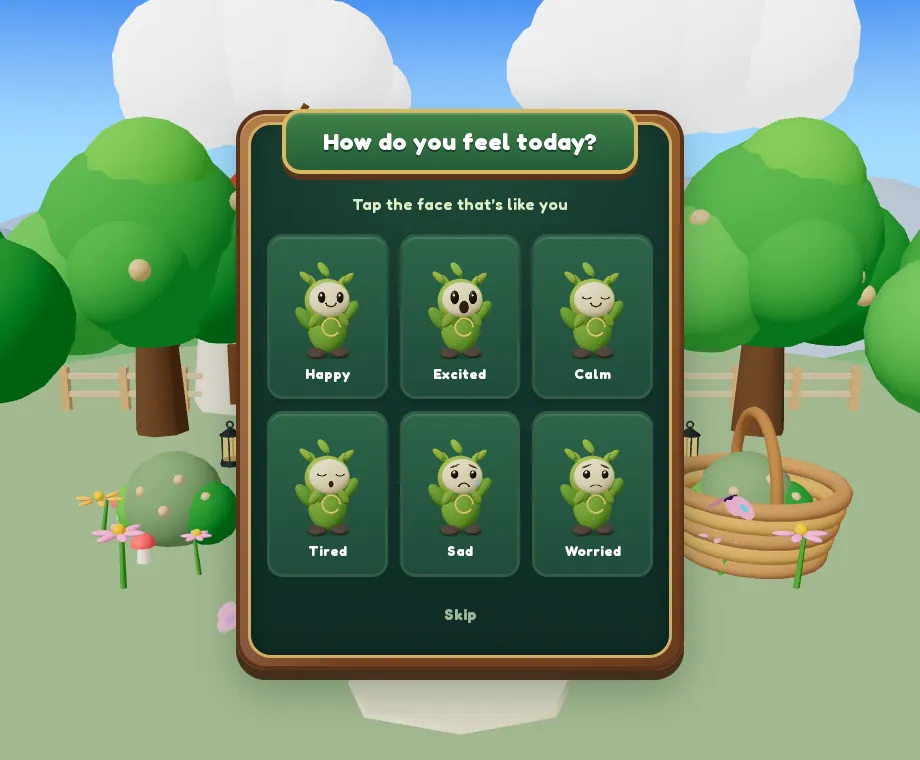
  1. How do you feel today?

    Once a day, six faces and one tap. The parent sees the trend.

  2. A portal per subject

    Maths, Reading, Arabic. A subject not yet placed opens its placement first, aligned with EGRA and EGMA.

  3. TapTab’s pick

    Up to three games that suit the lesson; the last lesson of a zone is always a boss battle.

  4. Play with a voice

    A “how to play” card first, and nothing is tappable before Start. A wrong answer dims that choice and reads the lesson’s own hint; three right answers in a row double the coins.

  5. Come back

    A reward chest, outfits for TapTab, then spaced reviews and a Big Challenge at the end of a year group.

1 · 3 · 7 · 14days before a concept comes back for review

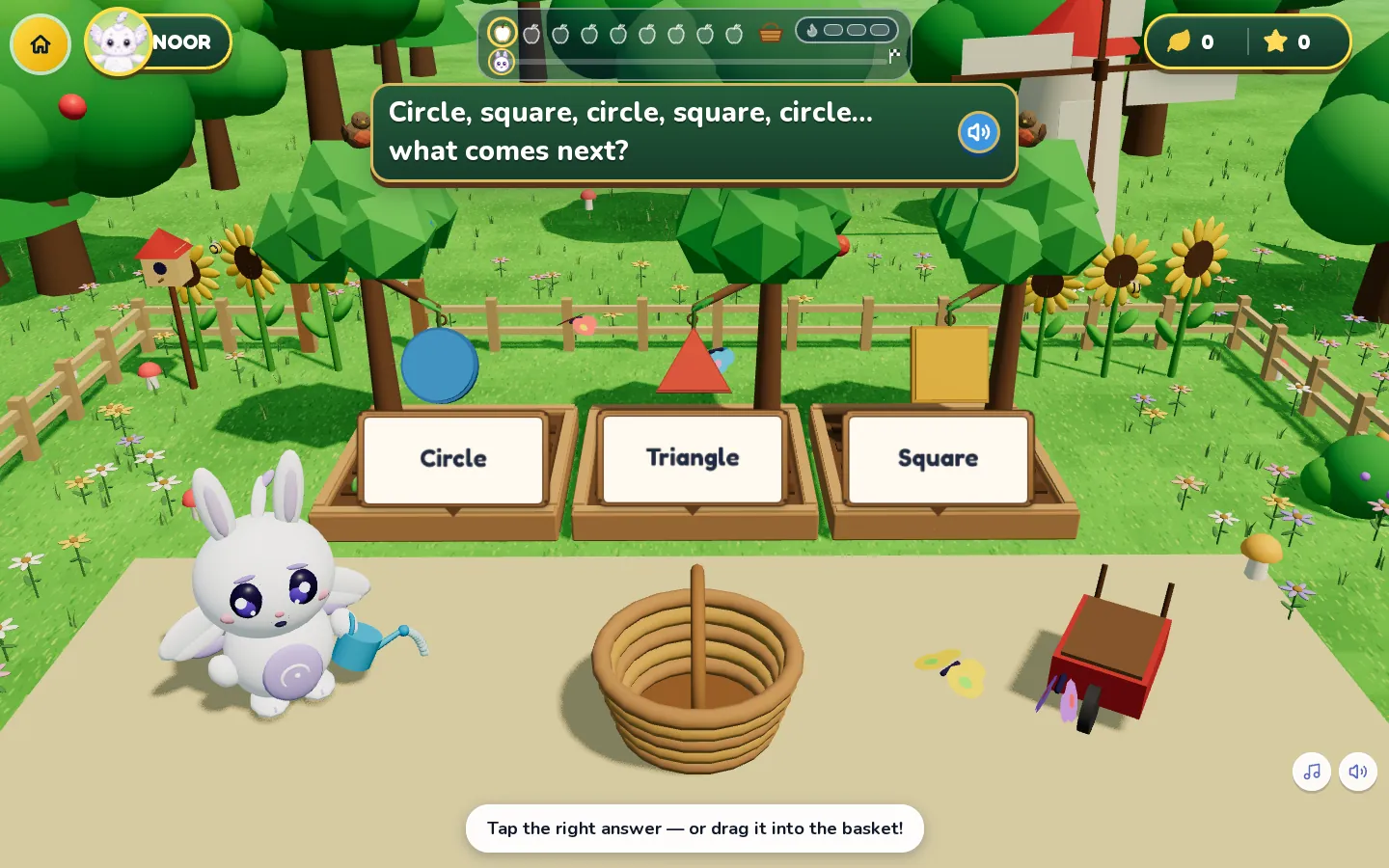
Kinderhaus: a round of Fruit garden
Fruit garden, a maths round: TapTab reads the question, the child taps or drags the answer into the basket.
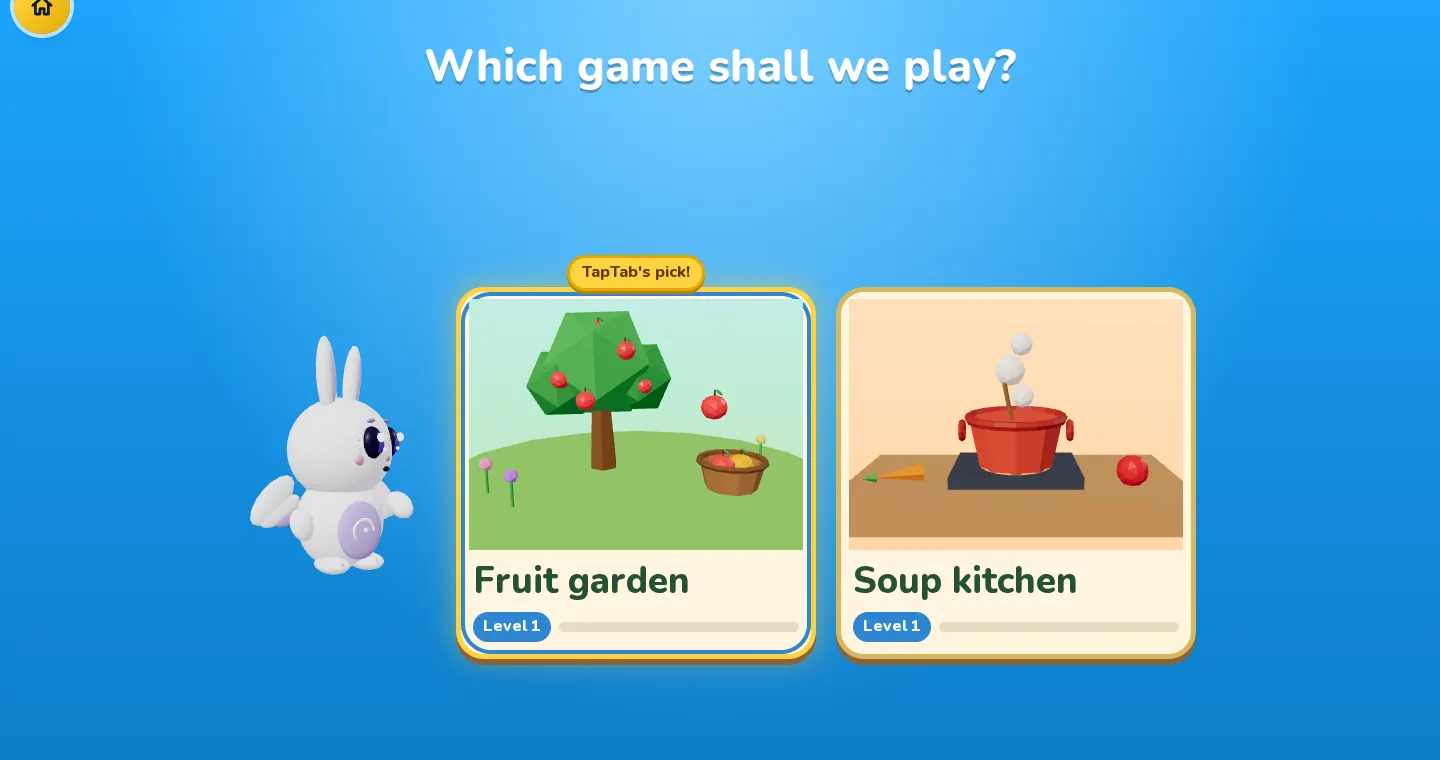
Kinderhaus: choosing a game
TapTab’s pick comes first; the other cards are games that suit this lesson’s content and level.
Kinderhaus: the daily feelings check-in
The daily check-in: six faces, one tap. The answer goes to the parent’s record as a trend.

Learning support

Support is a profile, not a separate app

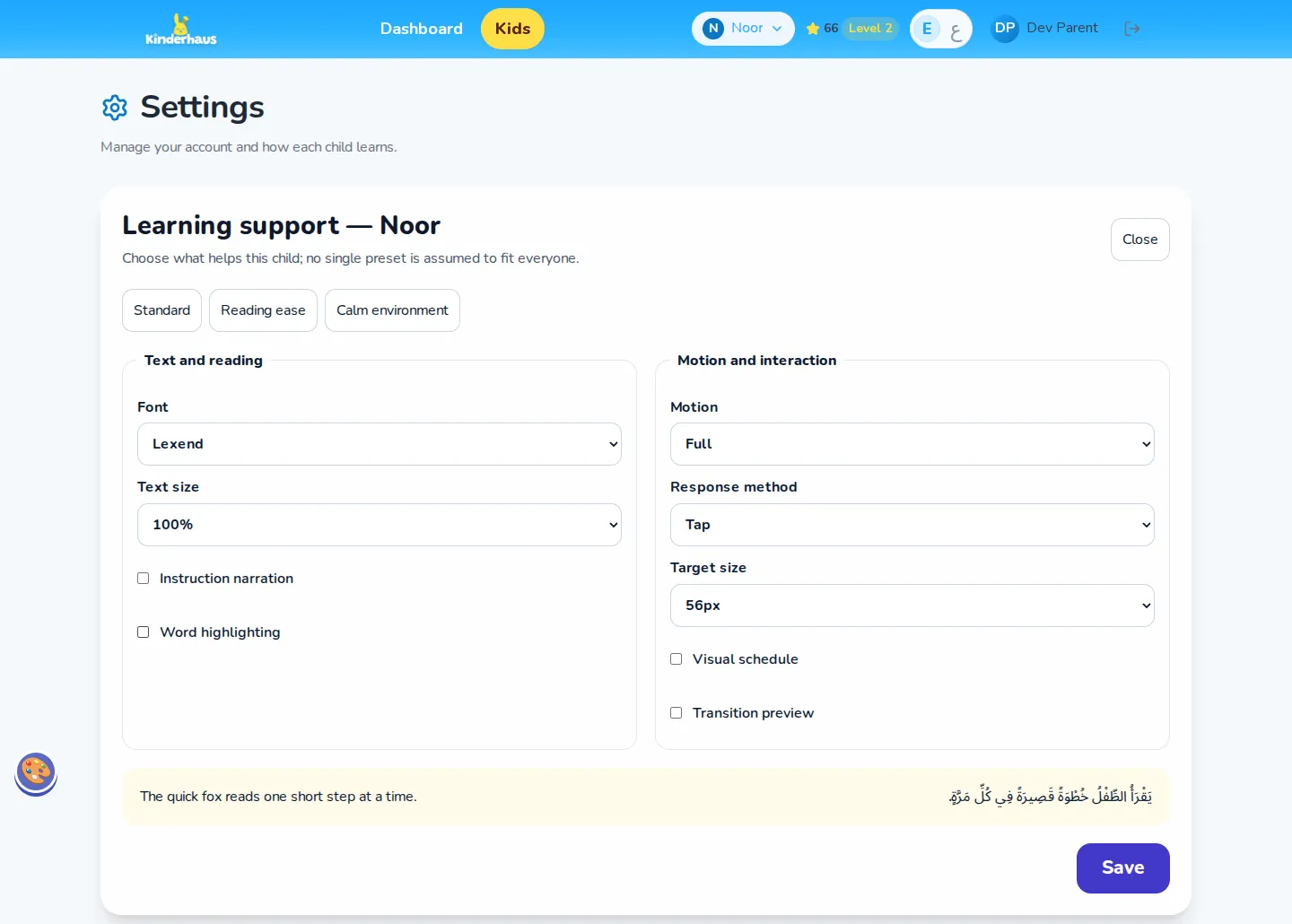
Each child has a profile, set by their parent and applied from the next lesson. The dyslexia, ADHD and autism profiles change the lesson itself: bigger answers, a checkpoint every third question, muted colours and a still scene.

PresetsStandardReading easeCalm environment

Text and reading

  • Lexend, Atkinson Hyperlegible or OpenDyslexic
  • Text at 100, 115 or 130%
  • Line height and letter spacing

Voice

  • Instructions read automatically
  • Speed from 0.75 to 1.25
  • Words highlighted as they are read

Senses

  • Full, reduced or still motion
  • Full, soft or muted sound
  • Celebrations and visual density

Interaction

  • Tap, keyboard, drag or switch
  • Standard, large or extra-large targets
  • Hold duration and scanning speed

Structure

  • A visual schedule
  • A preview of the next transition
  • Chunks of 1 to 5 items

In Arabic, letter spacing stays at zero: the letters have to stay joined.

Kinderhaus: a child’s learning-support profile
Learning support for one child, set by the parent: presets, then font, text size, narration, motion, response method and target size.

The parent

The record: what is actually happening

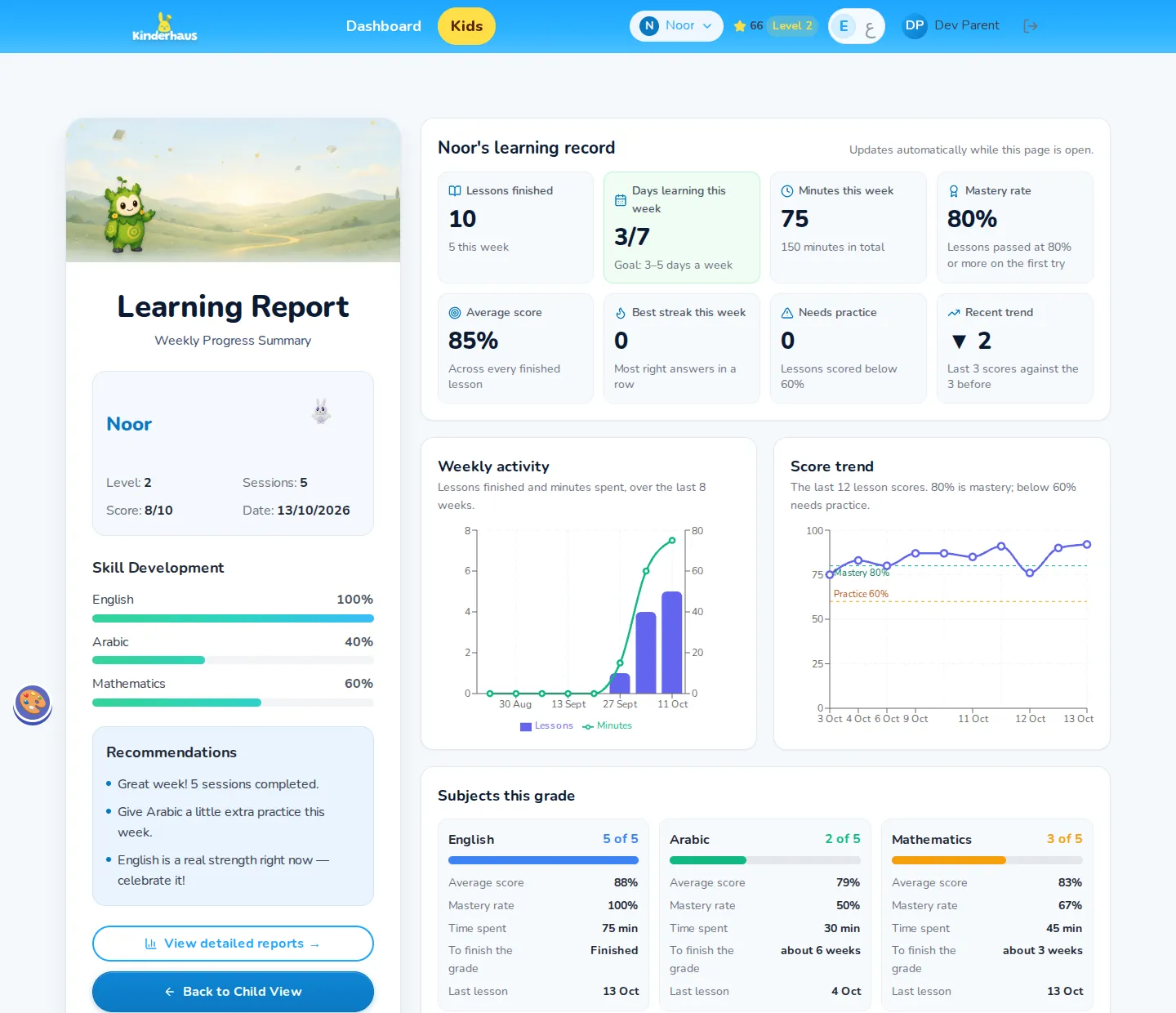
One page per child that updates while it is open, and a detail view per subject with the concepts that need practice and the teacher’s notes.

Kinderhaus: the parent’s learning record
The parent’s learning record: lessons, days learned against the 3–5 day goal, minutes, mastery, an 8-week activity chart and the score trend.
  • 80% and 60%

    Mastery is 80%. Below 60%, the concept is flagged to the parent and the teacher, and no lesson is withheld.

  • 3 to 5 days a week

    Days of learning are measured against a goal, never against other children.

  • One-way notes

    The teacher’s notes land on the parent’s page; replies go through the school’s usual channel.

The teacher

The teacher’s desk

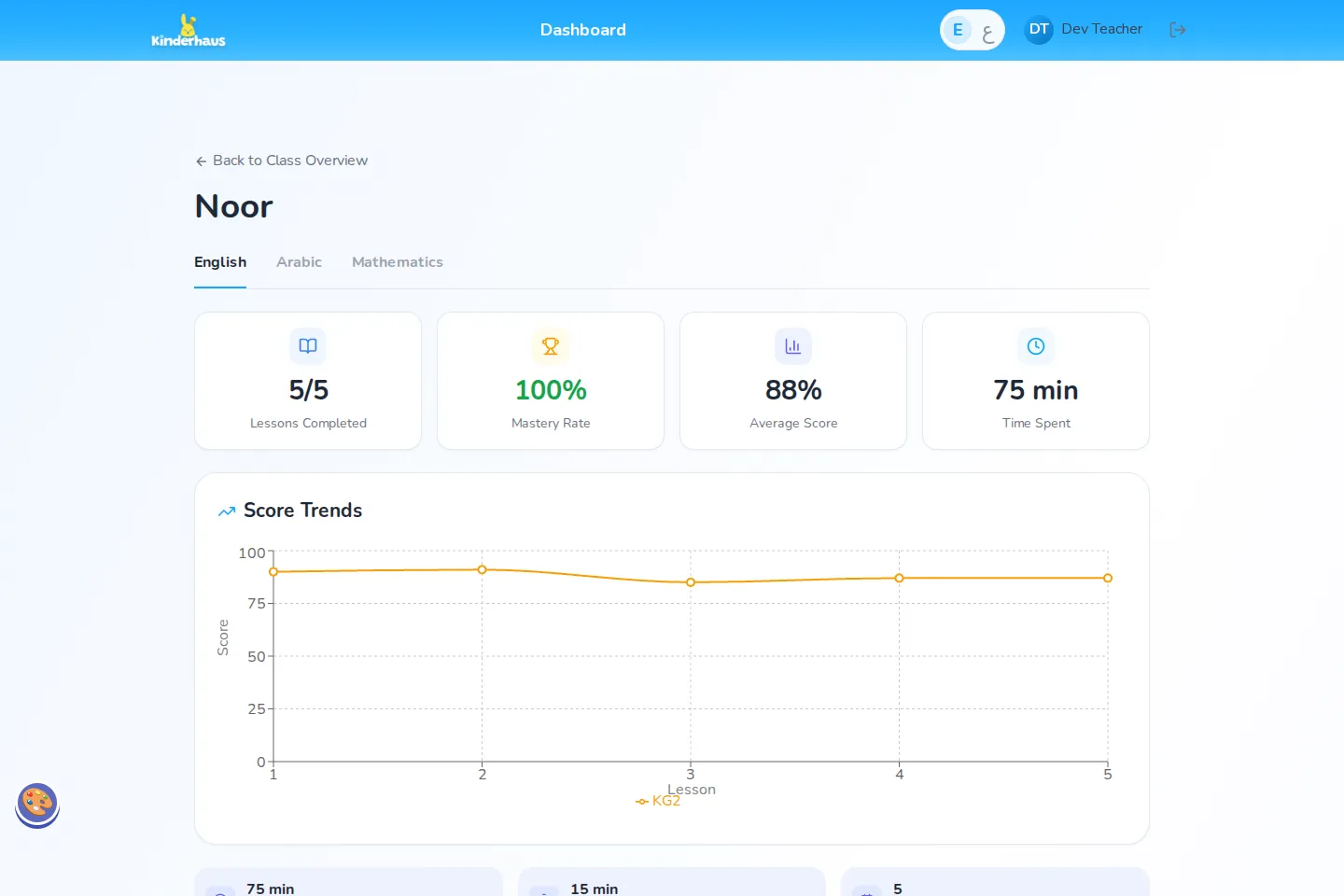
A class at a glance, then one student and one subject at a time: scores, time, the concepts that are hard, and the tools to step in.

Kinderhaus: a student page
One student, one subject at a time: lessons completed, mastery, average score, time, and the score trend lesson by lesson.
Kinderhaus: the teacher’s actions
Stepping in: assign a lesson, adjust the difficulty for a subject, ask for a new placement, switch challenges on or off, and leave a note for the parent.
Kinderhaus: the teacher’s class
The teacher’s class: grade, subjects, mastery and flagged topics per child, and the weekly-challenge board.

Assigning a lesson never skips placement: a subject the child has not been placed in sends them to the assessment first.

The administrator

Behind the lessons

The administrator runs accounts and class assignments, edits every lesson in English and Arabic, and sets the rules everything else applies.

How a lesson reaches a child

  1. Drafted

    In the authoring scripts, with help from Claude through the Vercel AI Gateway.

  2. Reviewed

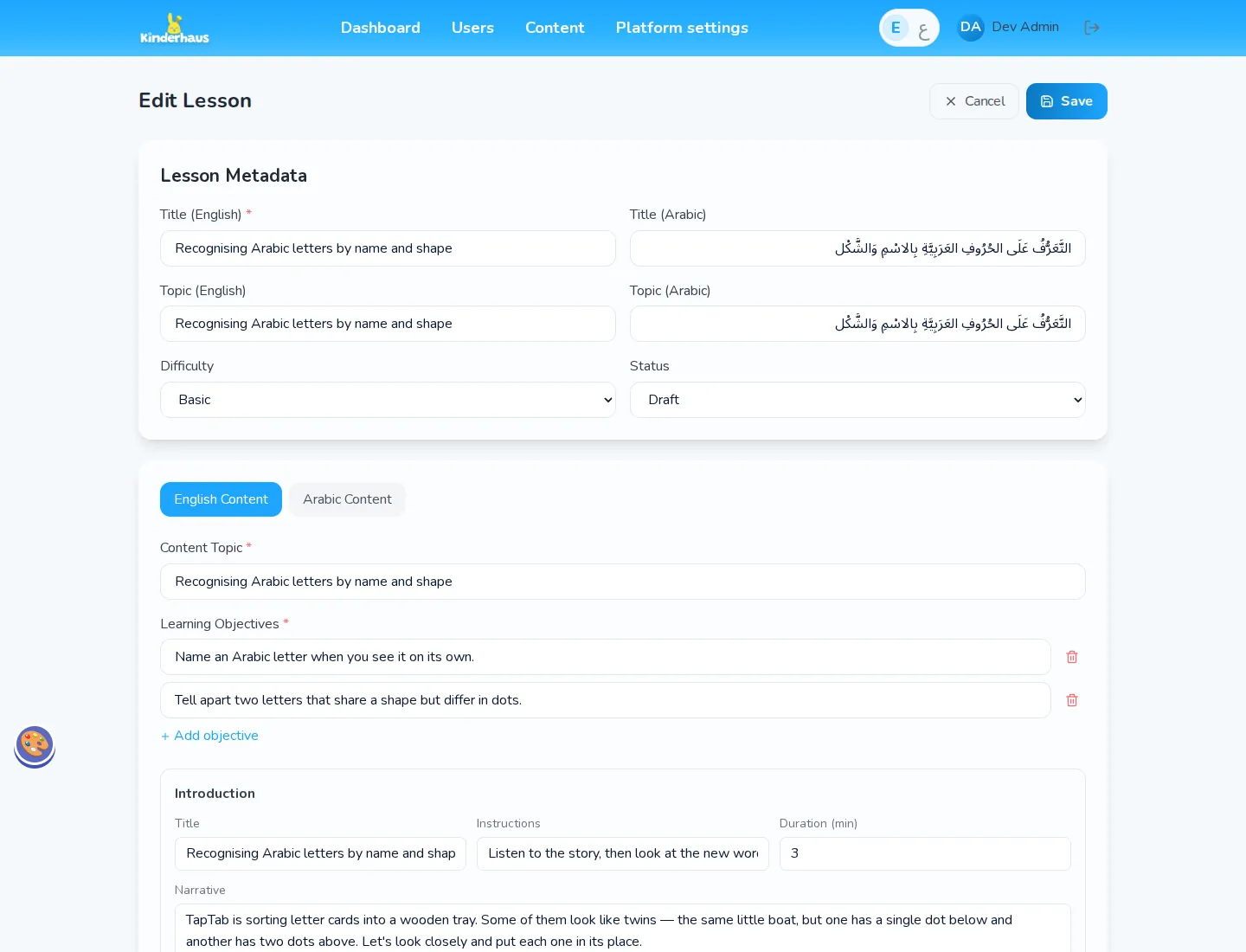
    In the editor, English and Arabic side by side, vowel marks included.

  3. Approved

    Who approved it, and when, is recorded.

  4. Playable

    Only after the quality checks pass, as a frozen version.

Kinderhaus: the lesson editor
The lesson editor: English and Arabic side by side, then introduction, guided instruction, practice, assessment and reward.

90lessons: 3 subjects × 6 year groups × 5 lessons

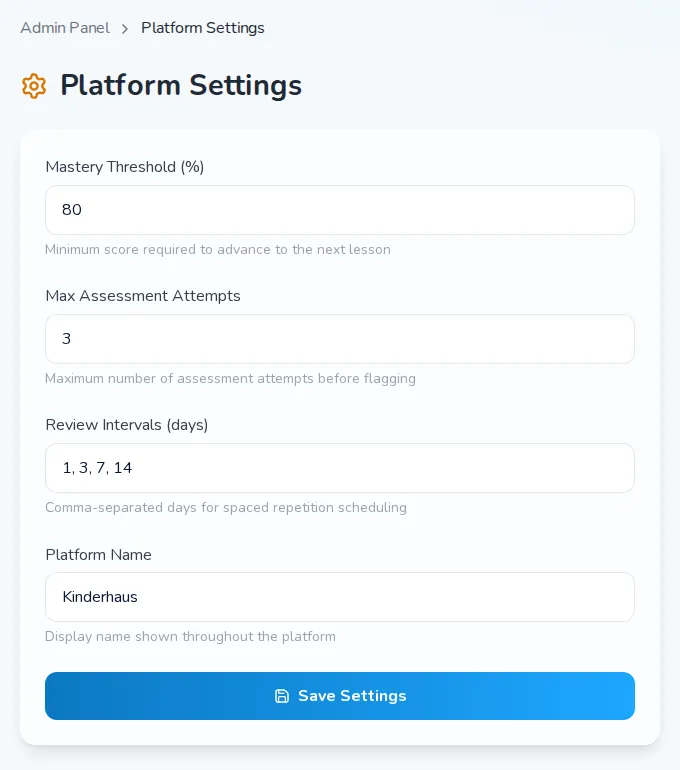
Kinderhaus: the platform rules
Platform rules the administrator owns: the mastery threshold, assessment attempts and the review intervals.

Results

What the platform does today

Kinderhaus is live at kinderhaus.io in English and Arabic, with 90 lessons across three subjects and six year groups. Every screen mirrors to right to left, and the lessons for the youngest years carry full vowel marks.

The roles are kept apart: a teacher cannot open a parent’s or a child’s screens and sees only the children assigned to them, and deactivating an account refuses sign-in without deleting a child’s record. The weekly-challenge leaderboard is off by default, shows first names only and rewards effort, not marks. The codebase ships with an automated test suite of more than 7,000 checks.

Key features

  • A 3D world for the child, one portal per subject, and TapTab reading every line aloud
  • A placement game per subject, aligned with EGRA and EGMA, that never asks for a school year
  • 3D lesson games where a wrong answer brings up the lesson’s own hint
  • A learning-support profile per child: fonts, text size, narration, motion, sound, target size and switch access
  • Reviews after 1, 3, 7 and 14 days, passed at 80%
  • A learning record for parents, with practice alerts below 60% and notes from the teacher
  • A class view for teachers, a page per student, lesson assignment and a difficulty override
  • A bilingual lesson editor with an approval workflow for administrators

Technologies

  • Next.js
  • TypeScript
  • Tailwind CSS
  • next-intl
  • React Three Fiber
  • Auth.js
  • PostgreSQL
  • Drizzle ORM
  • ElevenLabs
  • Vercel AI Gateway
  • Vercel

Your context

What system do you need to move forward?

Share the starting point, constraints and decision ahead. We will frame a useful first step.

Explore our services

Direct conversation · No imposed scope · Risks surfaced early

Services

Services related to this project.

What we do for companies with a similar need.